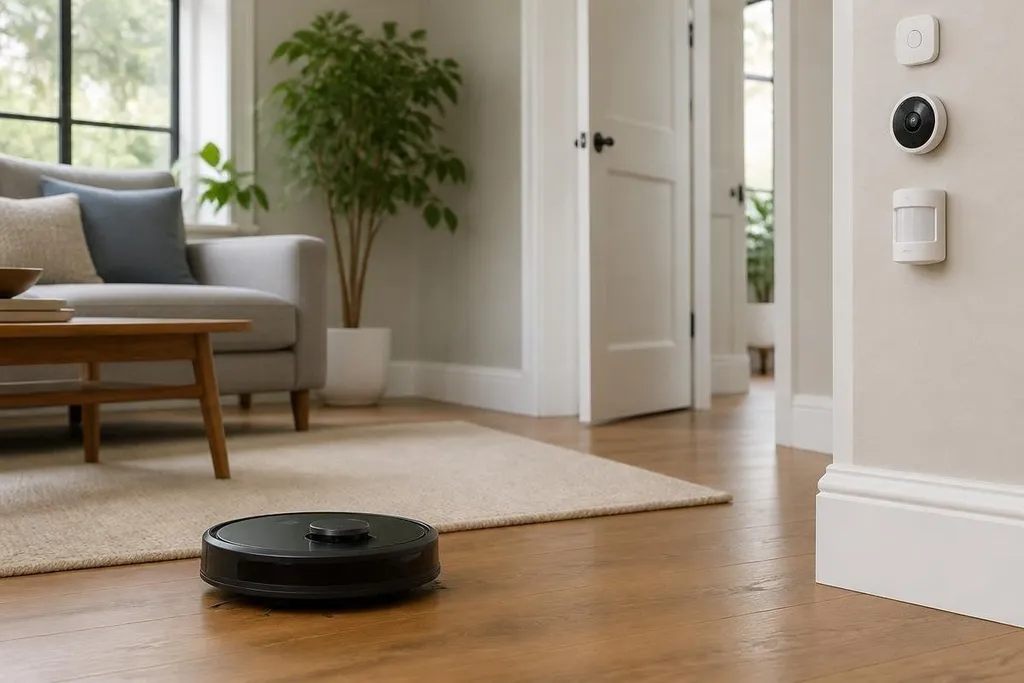
A home robot can vacuum a room, carry an item, or check on a person. Its value grows when the home can tell it what changed, where to go, and what to do next. The hard part is sharing useful information without giving one device control of everything.
- Home sensors can give robots a live view of doors, rooms, and obstacles.
- Robots can act on events that fixed smart-home devices cannot handle alone.
- Local control matters when cameras, microphones, or door locks are involved.
The home becomes the robot’s map
More than a floor plan, the robot needs to know that a door is closed, a chair moved, or a person is standing in the route. Smart-home sensors can supply those updates through a shared home network.
A door sensor can tell the robot that a room is open. A motion sensor can show that someone is nearby. A camera may give richer information, but it also brings harder privacy questions because the camera records images instead of a simple open-or-closed state.
The robot still needs its own sensors. LiDAR measures distance with light, and cameras help identify objects. Home data can reduce the work needed to check every room, but the robot must confirm that the information is still correct before it moves.
That handoff is where many designs will succeed or fail. A sensor may report an open door from several minutes ago, yet a child, pet, or delivery box may now block the path.
Robots can act on home events
Smart-home automation usually controls fixed equipment. A thermostat changes heating, a light turns on, or a lock reports its state. A mobile robot can move to the place where the event matters.
A leak sensor could send an alert to a robot near the kitchen. The robot could inspect the floor with a camera and send an image to a phone. A smoke alarm could tell the robot to leave the area, rather than sending it toward a possible fire.
Those actions need clear limits. A robot should not open a locked door because a software rule told it to enter. It should not carry medicine, move near a stove, or approach a person without rules that match the home and the task.
A smoke alarm can send an alert, but it can't tell a robot whether carrying a hot pan is safe. Reports on connected home robots can show how these systems share signals with sensors, locks, lights, and alerts during a home task. That leads to the next point: one shared network can still leave each robot with its own controller.
One network does not mean one brain
A connected home may contain devices from several makers. Each device can use different data formats, names, and access rules. A robot that sees “kitchen door open” needs a clear way to connect that message to its own map.
A shared software layer can translate those messages. It can also assign permissions, so a robot may read a temperature sensor but cannot control a door lock. That separation limits the damage from a faulty rule or a hacked device.
Local processing can help with privacy and response time. If the robot can read a motion sensor inside the home without sending every event to a remote server, fewer household details leave the building. The exact setup depends on the devices, software, and network chosen by the owner.
The system also needs a manual control. A person should be able to pause the robot, remove its access to a room, or review what event caused an action. Automation that cannot explain its last move will be hard to live with.
The limits are practical
Homes change more often than robot demos suggest. Furniture moves, floors become wet, pets sleep in new places, and guests may not know where the robot is operating.
A smart-home message can describe a condition, but it cannot guarantee a safe route. Power and network failures create another gap. A robot may need a charged battery to respond to an alarm, and a wireless device may stop sending updates when the network goes down.
Safety actions need local rules that still work without a cloud connection.
I'd keep each task narrow at first. Let the robot inspect a known room after a leak alert before asking it to manage security, deliveries, and care tasks across the whole house.
A practical setup guide
Use this checklist before connecting a robot to home automation:
- Name the task: Write down the event, the robot’s action, and the expected result.
- Limit access: Give the robot only the sensor and room permissions that task needs.
- Add a stop rule: Set a clear action for blocked routes, low battery, lost network, or uncertain sensor data.
- Keep a human control: Make pausing the robot and removing access possible from a local switch or phone.
- Test changed rooms: Move furniture and repeat the task so the robot faces conditions outside its stored map.
- Review the record: Check which sensor triggered the action and what the robot did afterward.
The next useful step for smart homes is not giving robots control of every device. It is making a few reliable handoffs work: a sensor reports a change, the robot checks the scene, and the owner can see why it acted.